Lift-and-shift is rarely as cheap as projected. The upfront migration cost is real but predictable. The costs that follow are not. Most enterprises that complete a lift-and-shift discover within 12 months that their cloud bill is 40 to 60 percent higher than their on-premises equivalent. Not because the cloud is expensive. Because they brought their old cost structure with them.
This post covers the specific cost categories that don’t show up in migration estimates, a framework for when they appear, and a decision process that will tell you whether lift-and-shift is even the right strategy before you start. If you’re still weighing the broader infrastructure case for cloud, see our guide on how infrastructure modernization reduces long-term cloud costs.
What Lift-and-Shift Actually Does to Your Bill
Lift-and-shift moves your technical debt from a sunk capital cost into a recurring monthly charge. That is the core dynamic most migration budgets ignore.
Lift-and-shift (rehosting) moves workloads from on-premises infrastructure to cloud VMs without changing application architecture. The appeal is clear: minimal engineering work, fast migration timelines, and a clean exit from data center contracts.
The problem is structural. On-premises infrastructure is provisioned for peak capacity. You buy servers sized for your busiest day of the year, then run them at 20 to 30 percent utilization the rest of the time. You’ve already paid for that unused capacity. When you move to the cloud, you pay for what you provision. You’re provisioning the same peak-sized footprint you already had.
Your cloud bill reflects the technical debt and over-provisioning you built up over years of on-premises operations. You didn’t eliminate that cost. You converted it from a sunk capital expenditure into a recurring operational charge. This is what makes lift-and-shift budgets fail: the cost doesn’t disappear, it just changes form and becomes visible every month.
The Migration Cost Visibility Framework
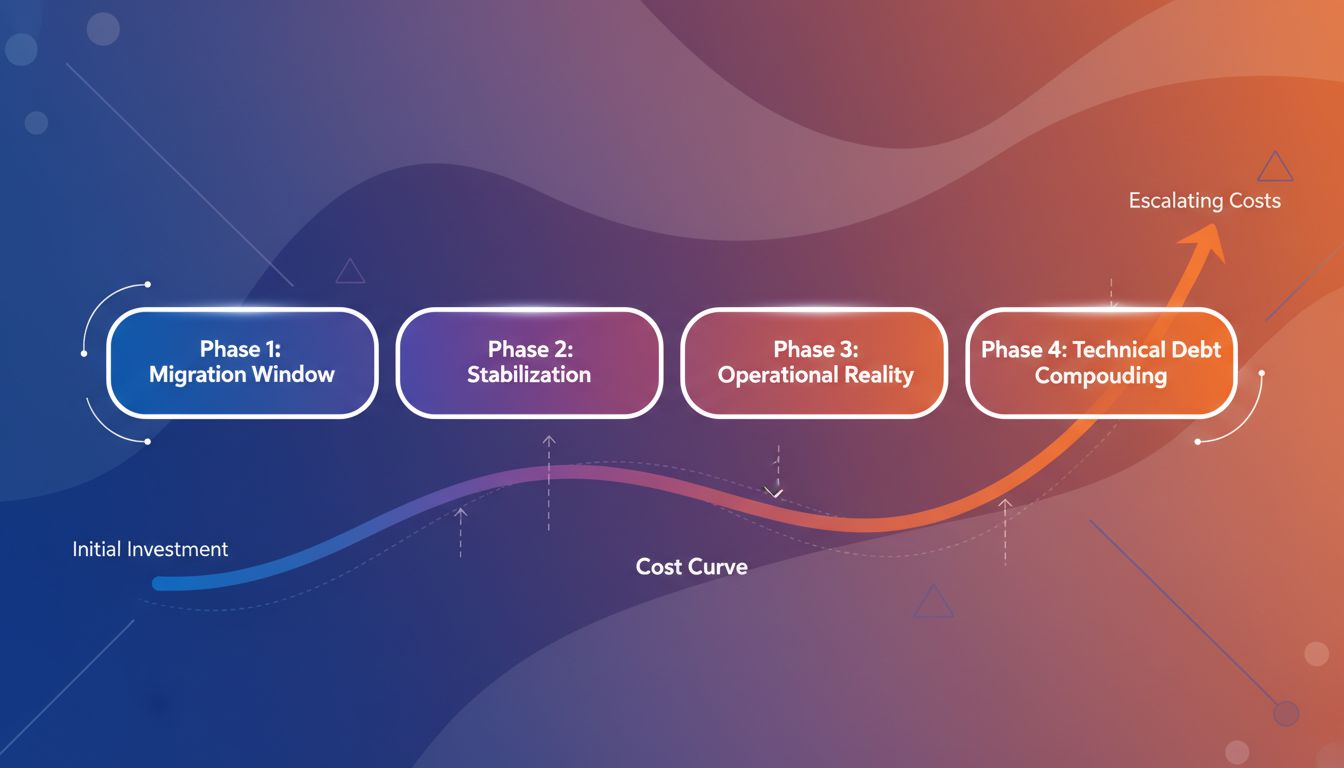
Not all lift-and-shift costs appear at the same time. The Migration Cost Visibility Framework (MCVF) maps hidden costs across four phases so you can budget for the full exposure, not just the migration project itself.
Phase 1: Migration window (weeks 1 to 8). Costs here are expected but routinely underestimated. Migration tooling licenses, professional services, and the engineering time to move workloads all land in this window. Less expected: the cost of running parallel environments. You need on-premises systems to stay live until you’ve validated everything in cloud. Most teams underestimate how long parallel operation runs. The median for enterprise migrations is 4 to 6 weeks per application cluster, not days.
Phase 2: Stabilization (months 1 to 3). This is where the first surprises arrive. Cloud egress charges begin accumulating as data flows between newly cloud-hosted applications and remaining on-premises systems. Storage costs rise as snapshot and backup policies copy what already existed without lifecycle rules to clean them up. Performance-related engineering work starts: latency issues between separated application tiers, database query optimization, and tuning that wasn’t needed when everything lived on the same physical network.
Phase 3: Operational reality (months 4 to 12). By this point, the original migration cost has been paid. What remains is the ongoing run cost, which is where the real divergence from projections shows up. Idle compute from over-provisioned instances. Unallocated spend with no clear owner, especially when workloads were migrated by multiple teams with inconsistent tagging practices. License fees for software that was already bundled in your data center contract but requires a separate cloud edition.
Phase 4: Technical debt compounding (year 2 and beyond). Lift-and-shift preserves the application architecture that drove your on-premises costs. Monolithic applications, inefficient database schemas, synchronous integrations that generate excessive data transfer: these don’t become cheaper in the cloud. They become more expensive, because every architecture inefficiency is now metered and billed directly. Teams that don’t modernize after the initial migration find their cloud costs growing at 15 to 20 percent annually even when their workload volume is flat.
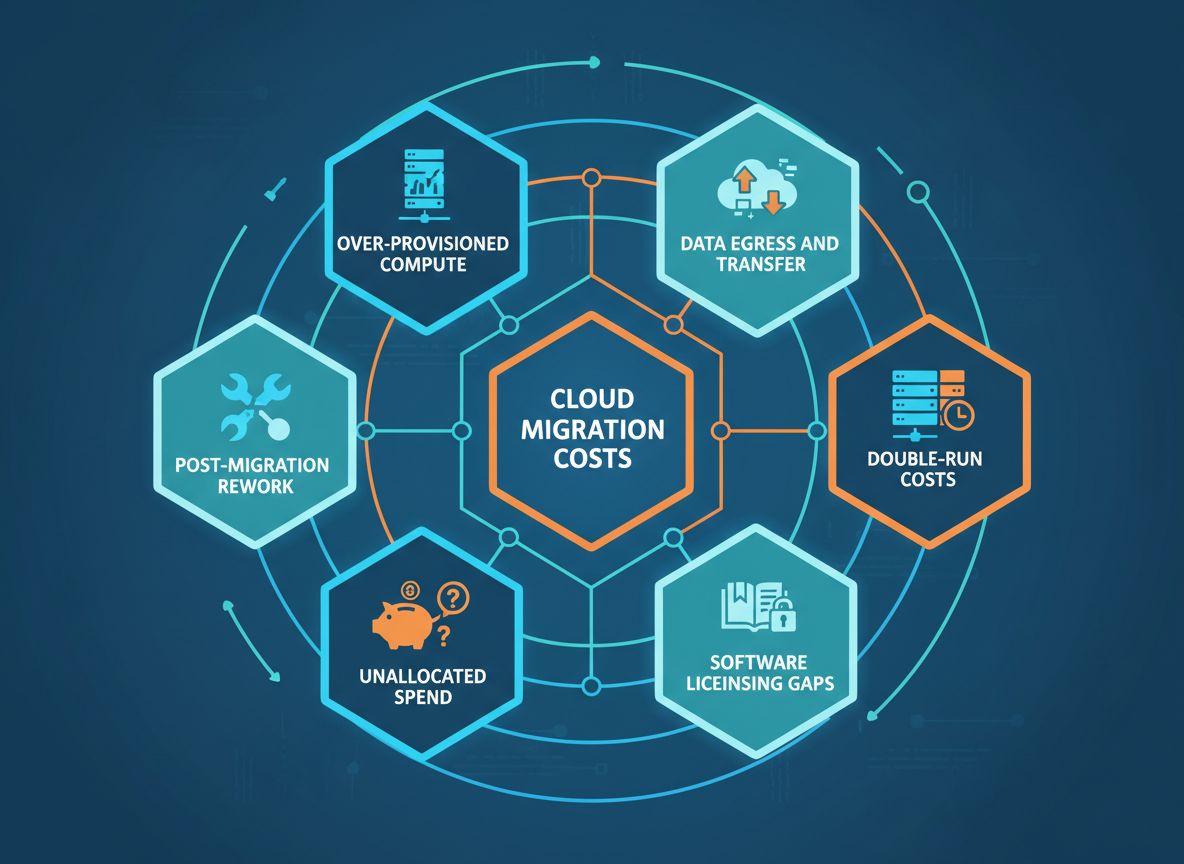
The 6 Hidden Cost Categories
1. Over-Provisioned Compute
Cloud instances sized to match your on-premises VM footprint are almost always oversized. Enterprise on-premises environments average 15 to 25 percent CPU utilization across their server fleet. Moving that footprint 1:1 to cloud compute means you’re paying for 75 to 85 percent idle capacity, now billed hourly instead of amortized over a 3 to 5 year hardware lifecycle. Flexera’s 2026 State of the Cloud report puts estimated wasted cloud spend at 29 percent of total enterprise cloud budgets, and over-provisioned compute is the leading driver.
2. Data Egress and Transfer
Cloud providers charge for data leaving their network. For enterprises running hybrid environments post-migration, with some workloads in cloud and some still on-premises, or data flowing to external partners, egress costs accumulate fast. A modest 10TB of monthly outbound transfer on AWS runs approximately $900 per month. Most migration budgets don’t include egress estimates because most migration planners don’t map data flows before moving workloads.
3. Double-Run Operational Costs
The parallel operation period is unavoidable. You’re paying for both environments simultaneously: on-premises contracts (which often can’t be cancelled mid-term) and cloud infrastructure for the migrated workloads. For large enterprises, this can represent 30 to 50 percent of the annual on-premises cost added onto the cloud bill for the duration of the migration window. Set a hard end date for parallel operation before migration starts. If you can’t meet it, escalate. Don’t extend the parallel period indefinitely.
4. Software Licensing Gaps
Many enterprise software licenses are tied to physical server counts or data center agreements. Moving to cloud often triggers a licensing review and, in many cases, a licensing uplift. Database licenses, middleware, and monitoring tools frequently require separate cloud editions or per-core pricing that doesn’t map cleanly to the physical-core count you were paying for on-premises. Pull your license agreements before migration starts. Flag anything with a physical-server or data-center clause and give yourself 30 to 90 days to adjust terms.
5. Unallocated Cloud Spend
On-premises, your costs are fixed: hardware, facilities, support contracts. They don’t accumulate while no one is watching. Cloud spend does. Development and staging environments created for migration testing often outlive the project by months. Without enforced tagging, cost allocation, and environment shutdown policies, these become permanent line items that no one owns. One pattern that appears consistently across enterprise migrations: the environments with the least clear ownership are the ones that run longest.
6. Post-Migration Engineering Rework
When performance degrades after migration and it often does, particularly for latency-sensitive or data-intensive workloads, the engineering cost to diagnose and remediate is rarely budgeted. Network path changes, storage I/O differences between on-premises SAN and cloud block storage, and connection pool behavior all shift when you move to cloud infrastructure. Resolving these issues post-migration means senior engineering hours billed at rates that add up quickly.
When Lift-and-Shift Is Actually the Right Answer
Lift-and-shift is not always wrong. The mistake is treating it as a permanent destination rather than a phase.
| Scenario | L&S Appropriate? | Reason |
|---|---|---|
| Data center contract expiring in 90 days | Yes | Speed is the constraint. Refactor after migration. |
| Application approaching end-of-life | Yes | Minimal value in refactoring before replacement. |
| Stable, low-traffic internal tool | Yes | Refactoring cost exceeds the value gained. |
| Customer-facing, high-traffic application | No | Architecture inefficiencies will compound monthly. |
| Application with heavy cross-region data transfer | No | Egress costs will exceed on-premises savings. |
| Legacy monolith under active development | No | Technical debt compounds quickly in cloud billing. |
| Compliance-heavy regulated workload | Evaluate | Depends on whether refactoring introduces compliance risk. |
The question isn’t whether lift-and-shift costs more than refactoring over a 3-year horizon. It does, consistently, with refactored applications running 30 to 50 percent cheaper in monthly cloud spend than their lift-and-shift equivalents. The question is whether the refactoring investment is worth making now, given your application’s expected lifespan and traffic. For applications that will be replaced within 24 months or that carry low utilization, lift-and-shift followed by decommission is often the lowest-total-cost path. See our analysis of the most common cloud migration mistakes for more on how teams get this sequencing wrong.
How to Audit for Hidden Costs Before You Migrate
Run this workflow before the first workload moves. Most teams skip it and spend 12 months fixing what it would have caught in a week.
- Map your data flows. Document every data movement between application components, databases, external systems, and user endpoints. This is the input for your egress cost estimate and the primary driver of post-migration architecture decisions.
- Inventory your licenses. Pull every software license agreement and identify anything with a physical-server or data-center clause. Flag these for review before migration starts. Many require 30 to 90 day notice periods to adjust terms.
- Rightsize before migrating, not after. Use your on-premises performance data from CPU, memory, and IOPS over the past 90 days to size cloud instances at actual utilization plus a 20 percent headroom buffer. Don’t map VMs 1:1. Most enterprise environments can reduce instance count by 30 to 40 percent with pre-migration rightsizing.
- Set a parallel-run budget. Define the maximum time you’ll run both environments simultaneously and the corresponding budget. Make this a hard constraint. If you can’t meet the cutover date, escalate. Don’t extend the parallel period indefinitely as a way to avoid risk.
- Establish tagging policy before the first workload moves. Every cloud resource needs a cost-center tag, application tag, and environment tag applied at creation. Retrofitting tags to an existing cloud environment is expensive and rarely complete. Build the schema first, enforce it via cloud policy, and audit compliance weekly during migration.
- Build a 24-month cost model. Your migration project budget and your year-1 operating budget are different documents. Build a 24-month cost model that includes run costs after migration, rightsized to realistic utilization. If you can’t demonstrate a total-cost advantage at month 24, revisit the approach before committing infrastructure spend. Our cloud migration cost calculator can help you build this model.
What Most Teams Get Wrong
The most common failure pattern is treating the migration project completion date as the end of the cost story. The project team hands off to operations, the migration budget closes, and the cloud bill becomes operations’ problem. Nobody owns the 12-month cost trajectory. By the time someone notices the bill is 50 percent over projection, the project team has disbanded and the institutional knowledge of what was migrated, how, and at what instance sizes is gone.
The second most common mistake is skipping the pre-migration rightsize because the team plans to do it after. Post-migration rightsizing is harder than pre-migration rightsizing. You now have production workloads that someone is nervous about touching, performance baselines that feel fragile, and a team that just finished an exhausting migration project. The rightsize gets deferred, then forgotten, and the over-provisioned cost structure runs for months or years.
The third mistake is conflating “moved to cloud” with “modernized.” Lift-and-shift is infrastructure relocation. Cloud-native architecture is a different project. Teams that complete a lift-and-shift and report cloud modernization success will face a reckoning when the technical debt tax shows up in the monthly bill in month 13.
FAQs
What is the average cost of a lift-and-shift cloud migration for an enterprise?
Direct migration project costs typically range from $500K to several million dollars for a mid-to-large enterprise, depending on application count, data volume, and complexity. That figure doesn’t include the 12 to 24 months of run cost that follows. Budget both numbers before committing to an approach.
Does lift-and-shift save money compared to staying on-premises?
Not reliably, and not immediately. Most enterprises see cloud bills 20 to 60 percent higher than their on-premises equivalent in the first year after a lift-and-shift. Savings materialize only after rightsizing and workload optimization work that typically takes 6 to 18 months post-migration.
How long does the parallel-run period typically last?
For enterprise migrations, parallel operation averages 4 to 6 weeks per application cluster. Large programs with hundreds of applications run parallel environments for 6 to 12 months across the full portfolio. The longer this period runs, the higher the total migration cost.
What’s the long-term cost difference between lift-and-shift and refactoring?
Refactored applications consistently run 30 to 50 percent cheaper in monthly cloud spend than lift-and-shift equivalents. The break-even on the higher upfront refactoring cost is typically 18 to 30 months, depending on application size and traffic volume.
Which cloud provider is cheapest for lift-and-shift migrations?
Cost comparisons between AWS, Azure, and GCP for lift-and-shift workloads vary significantly by workload type. Azure often offers better pricing for Windows Server and SQL Server workloads due to Hybrid Benefit licensing. AWS tends to be competitive for Linux workloads at scale. The cheapest provider for your specific workload mix requires workload-specific benchmarking, not a general comparison.
When should we refactor instead of lift-and-shift?
Refactor when the application is customer-facing with significant traffic, when it transfers large volumes of data regularly, when it will remain in active development for more than 24 months, or when your cost modeling shows the technical debt tax exceeding the refactoring cost within 18 months. Use the decision matrix above to apply these criteria to your specific workloads.
What To Do Next
Start with the data flow audit. Map your application’s data movements before you build a migration cost model. Egress costs are the hidden cost category most likely to generate the largest surprises, and they’re entirely visible if you do the mapping work upfront.
Second, build your 24-month cost model with Phase 3 and Phase 4 costs separated from the migration project budget. If you can’t demonstrate a total-cost advantage at month 24, revisit the approach before committing infrastructure spend.
Third, set your tagging policy now, even if migration is months away. The teams writing the tagging schema should not be the same teams under pressure to hit a migration cutover date.
If you want a structured review of your migration approach, cost model assumptions, and workload sizing, Zaplio’s infrastructure team works through this analysis with enterprise IT organizations before the first workload moves. The goal is catching the Phase 3 and Phase 4 surprises before they turn a successful migration project into a failed cost story. Reach out to discuss your migration plan.