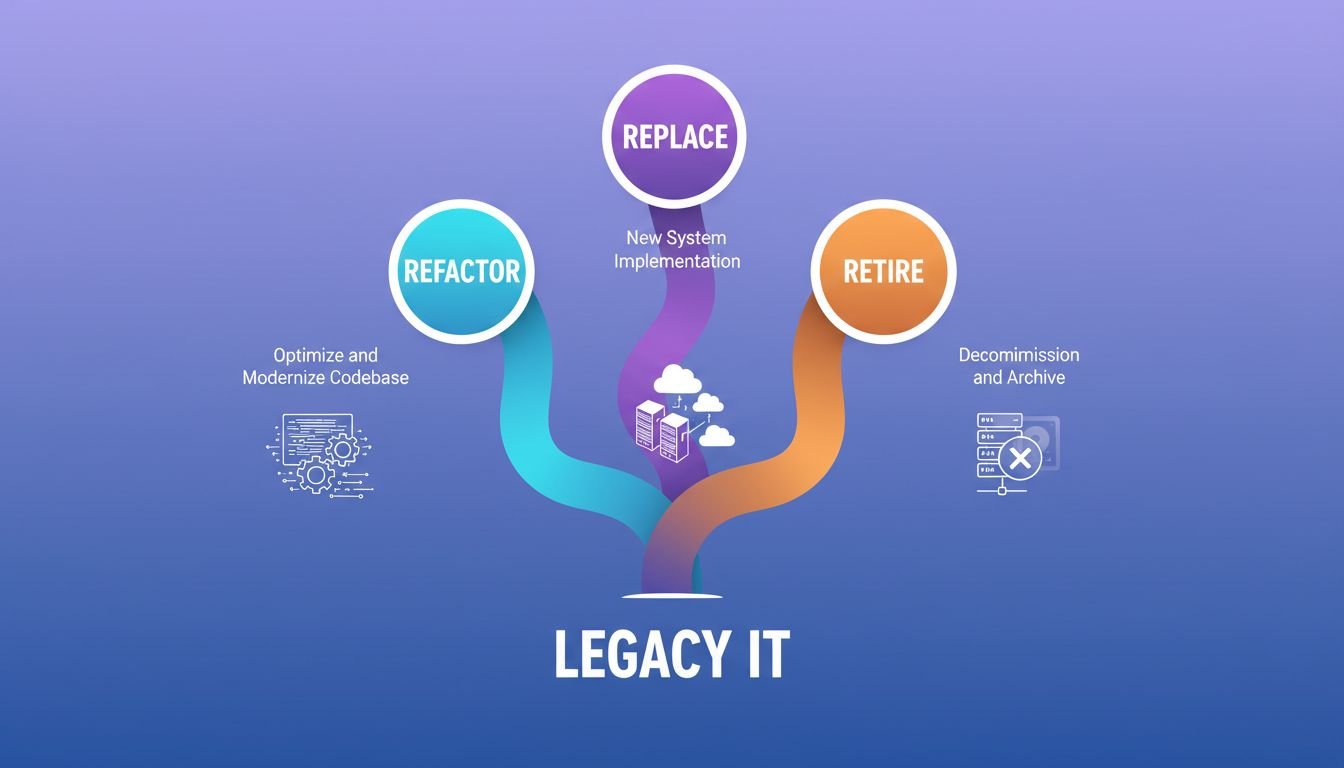
Every enterprise IT portfolio contains three kinds of applications: ones worth keeping and improving, ones that should be rebuilt or replaced outright, and ones consuming resources without delivering value that should simply be turned off. The decision between refactor, replace, and retire is the highest-leverage choice in any modernization program. Getting it wrong wastes years of engineering effort and millions in budget.
This guide gives you a concrete framework for making that call at the application level, a side-by-side comparison of what each path actually costs across a 3-year horizon, and the most common mistakes that send teams down the wrong path. For broader context on why this decision matters financially, see our guide on how infrastructure modernization reduces long-term cloud costs.
The Application Disposition Matrix
Score each application on two dimensions before deciding anything. The Application Disposition Matrix (ADM) maps Business Value and Technical Health to a clear disposition — Refactor, Replace, or Retire — and eliminates the ambiguity that sends modernization programs in the wrong direction for months at a time.
Business Value (score 1 to 5):
1: Minimal — used by fewer than 10 people, no integration dependencies, replaceable by a spreadsheet.
2: Low — supports a non-core process, viable SaaS replacement exists.
3: Moderate — supports an important but non-differentiating process.
4: High — supports core operations, significant integration dependencies.
5: Critical — revenue-generating or customer-facing, no viable off-the-shelf replacement.
Technical Health (score 1 to 5):
1: End-of-life — unsupported runtime, no internal expertise, cannot be updated safely.
2: Poor — high defect rate, no automated tests, deployment measured in weeks.
3: Fair — works but accumulates technical debt faster than it’s paid down.
4: Good — maintainable, deployable in days, some automated coverage.
5: Strong — cloud-ready, well-tested, under active contribution.
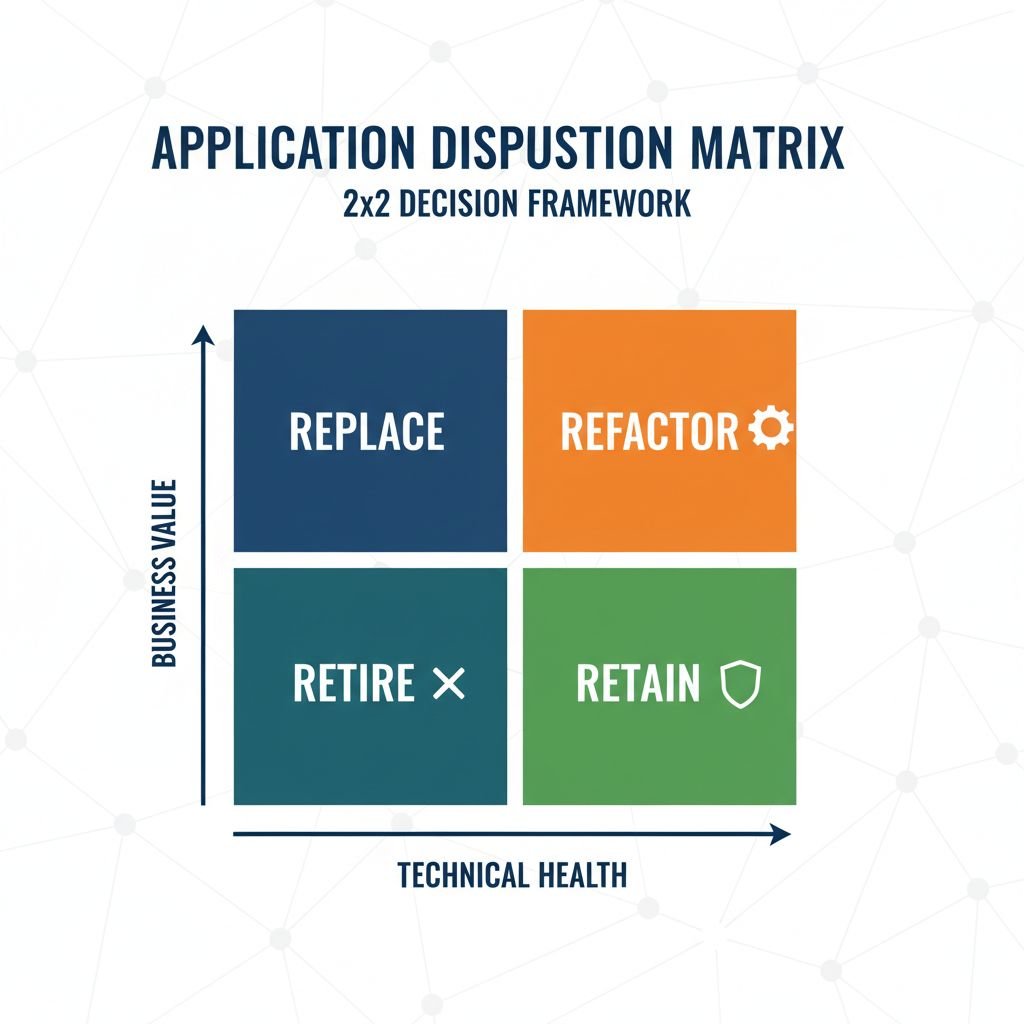
| Business Value | Technical Health | Disposition |
|---|---|---|
| 4 to 5 | 3 to 5 | Refactor |
| 4 to 5 | 1 to 2 | Replace |
| 1 to 3 | 1 to 2 | Retire |
| 1 to 3 | 3 to 5 | Retire or retain as-is |
| 3 | 3 | Evaluate — often best to retain and monitor |
Run this scoring exercise for every application in your portfolio before your modernization program begins. The scoring takes hours per application. The decisions it prevents can save months of misdirected effort. Enterprises that run the full ADM scoring exercise before their first modernization sprint consistently find the portfolio mix differs significantly from what leadership assumed going in.
When Refactor Is the Right Call
Refactoring makes sense when an application delivers high business value and its codebase is structurally sound enough to improve incrementally. You’re restructuring internals: extracting services, adding tests, replacing a monolithic deployment with smaller deployable units, or migrating from an on-premises runtime to a cloud-managed equivalent. The core application logic stays. The architecture improves around it.
The case for refactoring is strongest when three conditions hold simultaneously. First, the application has no viable commercial replacement — it encodes business logic your organization developed over years, and no SaaS product covers it at acceptable configurability. Second, the engineering team has enough institutional knowledge of the codebase to work in it safely. Third, the codebase has at least some automated test coverage, or it’s feasible to add it before restructuring starts. Refactoring without tests is not refactoring. It’s rewriting without a safety net.
Refactoring fails most often when teams underestimate scope. A codebase that looks “mostly OK” often reveals dependencies and architectural constraints that make incremental improvement impossible past a certain point. One pattern that appears consistently across enterprise modernization programs: teams begin refactoring a monolithic application, spend 6 months extracting services, and discover that the database schema is so tightly coupled to the application logic that the service extraction creates more problems than it solves. At that point, the refactor has become a replacement project — without the upfront planning and budget that a replacement would have received.
Set a refactoring scope threshold before starting. If the team estimates more than 18 months of refactoring work, or if the database schema requires significant structural changes, challenge whether replacement is the more honest path. The refactor-to-replace escalation is expensive because it’s unplanned.
When Replace Wins (and the Hidden Replace Trap)
Replace when a commercial product or a rebuilt application would deliver the business value more cheaply than the modernization work required to bring the existing codebase up to standard. This applies most clearly when an application’s Technical Health scores 1 to 2 and its Business Value scores 4 to 5: the function is too important to retire, but the codebase is too far gone to improve incrementally.
Replacement also wins when a viable SaaS product has emerged that covers your use case with acceptable configurability. Enterprises that built their own HR systems, CRM tools, or procurement platforms 15 to 20 years ago often have high-Business-Value, low-Technical-Health applications that map cleanly to a modern SaaS product. The replacement cost includes migration, data cleansing, integration re-wiring, and user retraining. Across a 3-year total cost of ownership, it frequently beats the ongoing engineering cost of maintaining a degraded codebase.
The hidden replace trap. The most expensive modernization mistake is starting a refactoring project that becomes a replacement 12 months in. This happens when the initial ADM scoring is too optimistic about Technical Health: teams score a codebase at 3 when the reality is 1 or 2, often because the engineers who know the codebase best also have the most attachment to it. When the refactoring scope expands past the original estimate by more than 50 percent, stop and re-evaluate the disposition. At that point, you’ve already paid part of the replacement cost as sunk refactoring effort. The question is whether to continue or redirect the remaining budget to a replacement project with proper scope and timeline.
Data migration is the most consistently underestimated replacement cost. Legacy applications often hold years of transactional data in schemas that predate modern data modeling conventions. Building and validating the migration pipeline typically takes longer than the application rebuild itself. Budget it separately, and build the migration validation suite before migrating anything.
When to Retire First
Retirement is the highest-ROI modernization action available to most enterprise IT portfolios, and it receives the least attention. The debate between refactor and replace assumes the application delivers enough value to keep. Many applications in large enterprise portfolios do not.
Applications accumulate the way technical debt accumulates: through a series of individually justifiable decisions that compound into a maintenance burden nobody planned for. A project management tool bought for a team that no longer exists. A reporting system replaced by a newer reporting system, but never decommissioned. A middleware component that was “temporarily” bridging two systems during a migration 8 years ago. Each of these applications costs money to host, license, support, and keep in compliance, often without a visible stakeholder who would notice if it stopped running.
Finding retirement candidates is straightforward if you have application usage logs. Any application with fewer than 10 active users in the past 90 days and no automated dependency chains is a candidate. Any application whose primary stakeholder has left the organization should be triaged immediately. Any application running on end-of-life infrastructure that would require significant investment to keep current is a retirement candidate unless it scores 4 to 5 on Business Value.
Enterprises that run an explicit retirement campaign before starting refactor or replace work typically find that 20 to 30 percent of their application portfolio can be decommissioned. That eliminates 20 to 30 percent of the maintenance burden without any of the risk that comes with refactoring or replacing active systems. The freed engineering capacity and budget can fund the harder work ahead. If your organization spends 60 to 80 percent of the IT budget on legacy maintenance — the range Gartner and PwC consistently report — retirement is the fastest path to reclaiming budget for forward investment.
Comparing the Three Paths
| Dimension | Refactor | Replace | Retire |
|---|---|---|---|
| Typical timeline | 6 to 24 months per application | 12 to 36 months per application | 1 to 6 months per application |
| Typical cost range | $150K to $1M+ | $200K to $3M+ | $10K to $100K |
| Primary risk | Scope creep into replacement | Data migration failure | Hidden dependency discovery |
| Team requirements | Codebase knowledge + test infrastructure | Project management + data engineering | IT ops + stakeholder alignment |
| Business disruption | Low to moderate if phased | Moderate to high during cutover | Low if dependencies are mapped |
| 3-year TCO trend | Decreasing if successful | Decreasing after stabilization | Immediate cost elimination |
How to Run an Application Portfolio Assessment
This is the prerequisite step most modernization programs skip, and its absence is the single most common cause of budget overruns in the first year.
- Build the inventory. List every application with its primary owner, monthly active users (from logs), hosting cost, license cost, and support cost. If you can’t pull this data, start with applications that appear in the IT budget with costs over $10K per year.
- Score using the ADM. Business Value and Technical Health, 1 to 5 each. Score with both the application owner and an engineer who works in the codebase, separately, then compare. Disagreements of more than 2 points on either dimension signal an application that needs more investigation before disposition.
- Identify immediate retirement candidates. Any application scoring 1 to 2 on Business Value is a retirement candidate regardless of Technical Health. Triage these first. Finding the stakeholder is the hard part — if there isn’t one, document that and proceed.
- Map dependencies before setting sequence. An application that serves as middleware for 5 other systems cannot be retired or replaced until those dependencies are resolved. Map them first. Starting with isolated, low-dependency applications reduces risk and builds organizational muscle for the harder work ahead.
- Set scope escalation thresholds in writing. Define in advance: at what point does a refactoring project get re-evaluated as a replacement? Without these thresholds, scope decisions get made by inertia rather than analysis, and teams discover they’ve been doing the wrong thing for a year before anyone calls it.
- Assign a single accountable owner per application disposition. Modernization programs that assign shared ownership to committees make slow decisions and default to the lowest-risk path regardless of what the ADM says. One person owns each application’s disposition and answers for its timeline and cost.
What Most Teams Get Wrong
The most common failure is treating modernization as a technical project rather than a portfolio management exercise. Technical teams evaluate applications through the lens of what’s feasible to change. Portfolio management asks what should be changed given business value and total cost of ownership. These two perspectives produce different answers. The portfolio management answer is right more often, and it’s the one that maps to budget and business outcomes that leadership can evaluate.
The second most common mistake is starting with the most technically interesting application rather than the highest-priority one. Refactoring a complex, high-visibility system is more engaging than retiring 40 dormant applications. The dormant applications generate faster, lower-risk ROI and clear the runway for the harder work. Letting the engineering team drive prioritization without portfolio-level constraints is the most reliable way to spend 12 months and show leadership nothing they can point to as a business win. For more on how this sequencing failure shows up in cloud programs specifically, see our post on the hidden costs of lift-and-shift cloud migration.
The third mistake is skipping the dependency mapping step. Teams retire an application and discover two weeks later it was feeding a nightly batch process that another system depended on. Finding that dependency takes an afternoon before retirement. Finding it after costs days of incident response and damages the modernization program’s credibility with leadership.
FAQs
What is legacy system modernization?
Legacy system modernization is the process of updating or replacing aging IT applications and infrastructure that can no longer meet current business, security, or performance requirements. It includes refactoring existing code, replacing applications with modern equivalents, and retiring systems that no longer deliver value. Successful programs treat modernization as portfolio management, not individual application development.
What is the difference between refactoring and rearchitecting?
Refactoring improves the internal structure of existing code without changing what the application does. Rearchitecting changes the fundamental design — breaking a monolith into microservices or moving from synchronous to event-driven architecture. Rearchitecting has a larger scope, higher risk, and longer timeline. It’s closer to replacement than to incremental refactoring, and should be budgeted and scoped accordingly.
How long does legacy system modernization take?
Scope drives timeline significantly. Retiring a standalone application can take weeks. Refactoring a complex enterprise system takes 6 to 24 months. Replacing a mission-critical platform takes 12 to 36 months. Enterprises running full portfolio modernization programs across dozens of applications typically work in 2 to 3 year waves, with the first wave focused on retirement and low-risk refactoring to free capacity and build organizational confidence.
How much does legacy system modernization cost?
Direct costs range from under $100K to retire a low-complexity application to several million for a mission-critical platform replacement. Gartner and PwC report that enterprises spend 60 to 80 percent of IT budgets maintaining legacy systems. Modernization programs that successfully reduce the legacy burden typically achieve 25 to 35 percent infrastructure cost reduction over 3 years, with a payback period that rarely falls under 18 months.
What is the biggest risk in legacy system modernization?
Scope expansion is the most consistent risk. Refactoring projects that escalate into replacement projects without a formal re-scoping exercise blow budgets and timelines in ways that damage the modernization program’s credibility with leadership. Setting explicit escalation thresholds — specific points at which the team must stop and reassess the approach — is the most effective control against this risk.
How do you decide whether to refactor or replace a legacy system?
Score the application on Business Value and Technical Health using the Application Disposition Matrix. High Business Value with strong Technical Health points to refactoring. High Business Value with poor Technical Health points to replacement. Low Business Value in either condition points to retirement. The scoring exercise also surfaces disagreements between stakeholders that, if left unresolved, derail the project later.
What To Do Next
Start with the portfolio inventory. You can’t choose between refactor, replace, and retire without knowing what’s in your portfolio and what each application costs to maintain. Pull the IT budget line items, the usage logs, and the hosting and license costs before scoping any modernization work.
Run the ADM scoring on every application with costs over $50K per year or more than 50 active users. Do this before committing to any specific modernization project. The scoring often reveals that applications leadership assumed needed expensive refactoring should actually be retired, and that applications engineering wanted to refactor should actually be replaced.
If your portfolio has more than 20 applications, run the retirement campaign first. Clear the dead weight, reclaim the maintenance budget, and use the freed capacity to fund the higher-risk refactoring and replacement work that follows.
Zaplio’s infrastructure team runs structured application portfolio assessments, including ADM scoring, dependency mapping, and sequenced modernization roadmaps, as a standalone engagement before any implementation starts. Contact us to discuss a portfolio assessment.