Most managed IT SLAs promise “24/7 support” and “guaranteed uptime,” then leave both terms undefined. If your current contract does not specify a response time by priority level, an uptime percentage measured over a stated window, and a named remedy when the provider misses either, you do not have an SLA. You have a sales pitch with a signature on it.
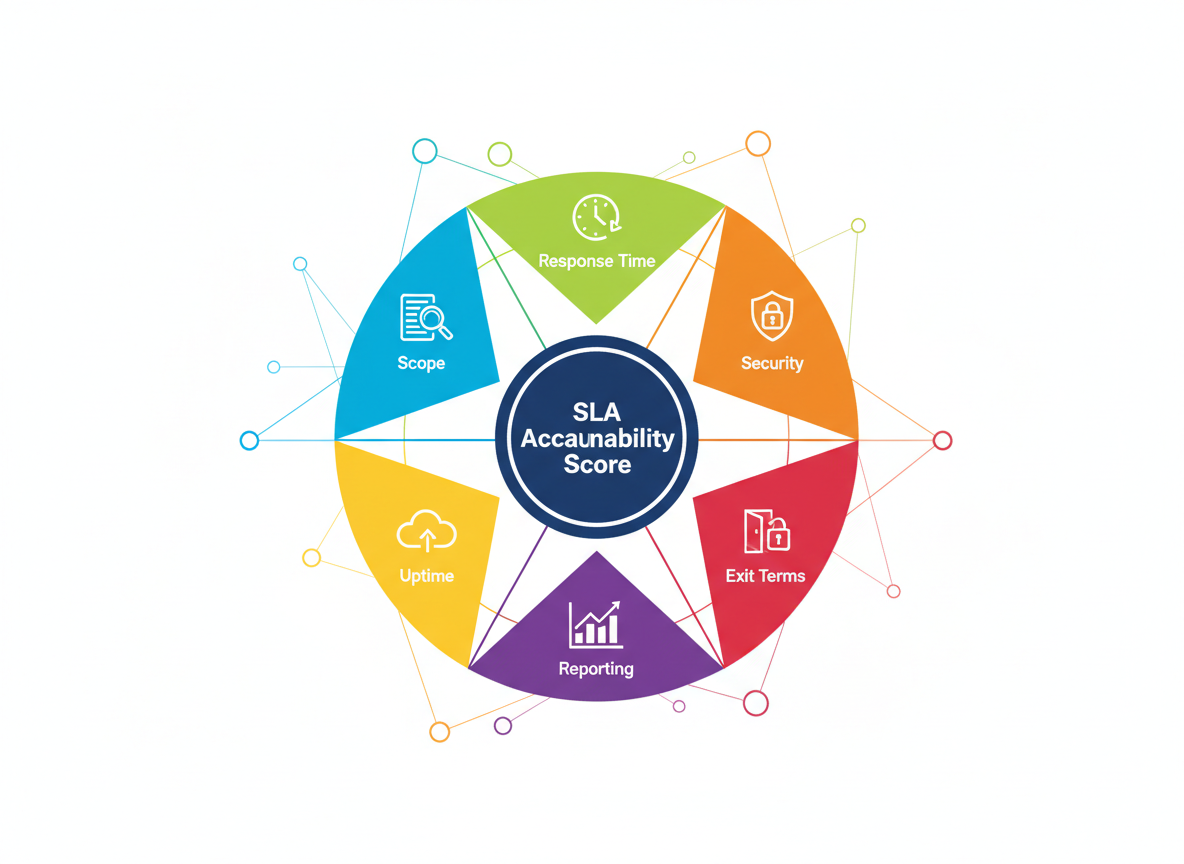
A real managed IT SLA is a document with six parts: scope, response and resolution targets, uptime commitments, security ownership, reporting cadence, and exit terms. Everything else, the marketing language about “world-class support” and “enterprise-grade reliability,” is filler wrapped around those six parts. This guide walks through what belongs in each one, gives you a scoring framework to grade your current or prospective provider, and flags the gaps that let MSPs quietly under-deliver while staying technically compliant with the paper you signed.
What Does a Managed IT SLA Actually Cover?
A managed IT SLA defines the measurable commitments your provider owes you in exchange for your monthly spend. That means specific numbers, not adjectives. “Fast response” is not a commitment. “15-minute acknowledgment for Priority 1 tickets, 24 hours a day” is a commitment.
The document should cover which systems and users are in scope, how tickets get classified into priority tiers, how fast the provider must respond and resolve issues at each tier, what uptime percentage applies to which services, who owns which piece of your security posture, how often you receive performance reporting, and what happens if you need to leave. If any of those six are missing or vague, you are carrying risk the contract should be carrying instead.
One pattern we see across enterprise IT teams switching providers: the incumbent MSP’s SLA reads fine on page one and falls apart by page four, where “response time” quietly gets redefined as “time to first automated ticket confirmation” rather than “time to a technician engaging the problem.” That distinction alone can turn a promised 15-minute response into a real-world four-hour wait.
How Should Response and Resolution Times Be Structured?
Response and resolution times should be tiered by business impact, not treated as a single blanket number. A server outage affecting your whole finance team is not the same urgency as one employee’s printer not connecting, and your SLA should say so explicitly.
Most enterprise-grade SLAs use four tiers, a structure consistently recommended across MSP contract guidance. Priority 1, a critical outage affecting multiple users or revenue-generating systems, should carry a 15-minute response and a 1-hour resolution target or restoration of service through a workaround. Priority 2, a significant issue affecting one department or a key system, typically gets a 30-minute response and a 4-hour resolution window. Priority 3, a moderate issue affecting a single user without blocking their core work, usually sits at a 2-hour response and next-business-day resolution. Priority 4, a minor request or how-to question, can reasonably sit at a next-business-day response with no formal resolution clock.
As one MSP contract review notes, a strong SLA defines measurable targets, not best-effort support. The critical detail buyers miss: response and resolution are different clocks measuring different things, and a weak SLA blurs them on purpose. Response is when a qualified technician engages your ticket. Resolution is when the problem is actually fixed or worked around. A provider hitting “response” targets while missing “resolution” targets every month is still failing you, even if their monthly report looks green.
What Uptime Commitment Should You Expect?
You should expect a stated uptime percentage, a defined measurement window, and a service credit that actually costs the provider something when they miss it. For core infrastructure (network, servers, primary business applications) 99.9% uptime is the current market floor, which allows roughly 43 minutes of unplanned downtime per month. For systems where downtime directly stops revenue, some providers commit to 99.99%, which allows about 4 minutes per month.
Scheduled maintenance windows should be defined and excluded from the uptime calculation, but that exclusion needs limits. A provider that can declare unlimited maintenance windows at will has effectively written themselves an uptime commitment with no teeth. Cap maintenance windows to a specific monthly hour allowance and require advance notice, typically 48 to 72 hours, except for emergency security patching.
Service credits matter more than the percentage itself. A 99.9% commitment with no consequence for missing it is not a commitment, it is a target. Look for a tiered credit structure: a stated percentage of the monthly fee credited back for each threshold missed, with credits stacking if the provider misses multiple months in a row. If the SLA has an uptime number but no credit language, that is your first red flag.
Who Should Own Security Under the SLA?
Security ownership under a managed IT SLA should be split explicitly between what the provider patches and monitors continuously and what requires your sign-off before action. Vague language here is where the most expensive gaps live, because “we handle security” can mean anything from full 24/7 SOC monitoring to a monthly antivirus scan.
The SLA should specify patch timelines by severity (critical vulnerabilities patched within 24 to 72 hours, standard patches on a defined monthly cycle), whether monitoring is continuous or business-hours-only, who is on call for a suspected breach and how fast they engage, and what your provider does versus what stays your responsibility, like final approval on firewall rule changes or access provisioning for new hires.
Backup and disaster recovery deserve their own line items, not a single sentence. You need a stated Recovery Point Objective, how much data you could lose in a failure, and a Recovery Time Objective, how long restoration takes. A provider who backs up nightly but can only restore in 48 hours is not giving you disaster recovery, they are giving you an expensive archive. Security risk management and SLA security ownership should be read together, since a weak SLA often signals a weak underlying security program.
What Reporting Should the SLA Guarantee?
The SLA should guarantee a recurring, structured report showing actual performance against every committed metric, delivered on a fixed schedule, not produced on request. Monthly is standard for most enterprise accounts, with a quarterly business review layered on top for strategic alignment.
That report needs to show real numbers: tickets by priority and their actual response and resolution times, uptime achieved against the committed percentage, security events and how they were handled, and any credits owed for missed targets. A provider that cannot produce this without manual effort each month is telling you their monitoring stack is not mature enough to actually track the SLA they signed.
Ask to see a sample report before signing. If the provider cannot produce one, or if the sample is a marketing summary rather than raw ticket-level data, that gap will not fix itself after the contract starts.
The SLA Accountability Score: A Framework for Grading Any MSP Contract
Use the SLA Accountability Score to grade a current or prospective managed IT contract across the six areas that actually determine whether an SLA holds up under pressure. Score each category from 0 to 5, where 0 means the SLA is silent on that item and 5 means it is fully specified with numbers, timelines, and consequences.
The six categories are scope definition (does it name the exact systems, users, and hours covered), response and resolution targets (are both defined separately, by priority tier, with actual numbers), uptime commitment (is there a percentage, a measurement window, and a real service credit), security ownership (are patch timelines, monitoring hours, and breach response named), reporting cadence (is there a fixed-schedule report with raw performance data), and exit terms (is there a defined transition period and data handoff process with no penalty).
Add the six scores for a total out of 30. A score above 24 indicates a genuinely accountable SLA. A score between 15 and 24 means the contract has real gaps worth renegotiating before signing or renewing. Below 15, the document is closer to marketing copy than a service commitment, and you should treat every uptime or response claim in it as unverified until proven otherwise.
SLA Accountability Score Calculator
Rate your current or proposed managed IT SLA on each item, 0 (silent) to 5 (fully specified with numbers and consequences).
Standard vs. Premium vs. Single-Partner SLA: How the Tiers Actually Differ
Most MSPs sell three effective tiers of SLA, even when they market more package names than that. The real differences show up in response time, uptime commitment, security depth, and how many separate vendors you are coordinating to keep the whole stack running.
| SLA Element | Standard MSP Tier | Premium MSP Tier | Single-Partner Enterprise Tier |
|---|---|---|---|
| Priority 1 response | 1-2 hours | 30 minutes | 15 minutes |
| Core system uptime | 99.5% | 99.9% | 99.9% to 99.99% |
| Security monitoring hours | Business hours | 24/7 automated | 24/7 with named analyst escalation |
| Reporting cadence | Quarterly | Monthly | Monthly plus quarterly business review |
| Vendor coordination | You manage handoffs between MSP, ISP, cloud vendor, security vendor | MSP coordinates most, some gaps remain | One accountable party for the full stack |
| Service credits | Rare or capped low | Tiered, moderate | Tiered, stacking, contractually enforced |
The vendor coordination row is where most enterprise IT teams lose the most time without realizing it. When your network, security, cloud, and helpdesk sit with four different providers, an outage at 2 a.m. becomes a round of phone calls to figure out whose SLA clock even started, before anyone begins fixing the actual problem. A single accountable partner collapses that coordination overhead into one call and one contract, which is why the uptime and response numbers in a single-partner SLA tend to be tighter than what a fragmented stack can realistically deliver.
How to Audit and Negotiate a Managed IT SLA: A Six-Step Workflow
Start by pulling your current SLA, or the proposed one from a prospective provider, and running it through the SLA Accountability Score above before you do anything else. Write down the actual score, not your impression of the document, so you have a number to negotiate against rather than a feeling.
Next, request three months of real performance data if you are evaluating a current provider, or three reference accounts of similar size if you are evaluating a new one. Ask the references directly whether the provider has ever missed an uptime or response commitment, and what happened when they did.
Third, map every system your business actually depends on against the SLA’s stated scope. It is common to find production databases, VPN infrastructure, or a critical SaaS integration sitting outside the documented scope entirely, which means they carry zero SLA protection even though your business treats them as essential.
Fourth, price out what an hour of downtime actually costs your business in lost revenue, idle staff time, and recovery labor. Compare that number to the service credit you would receive for a missed uptime target. If the credit covers a fraction of your real cost, you are self-insuring a risk the contract implies your provider is covering.
Fifth, negotiate the gaps you found in writing, not verbally. If a sales conversation promises “we always respond faster than that in practice,” get it in the contract or treat the promise as non-binding, because it is.
Finally, set a calendar reminder to re-run the SLA Accountability Score at renewal, not just at signing. Providers that score well in year one sometimes let reporting cadence and response consistency slip once the relationship feels settled, and the only way to catch that early is to keep measuring.
What Most Teams Get Wrong When Signing an MSP Contract
The most common mistake is treating the sales deck as the SLA. Sales conversations describe best-case scenarios. The SLA describes the floor you are contractually guaranteed, and the floor is what matters during an actual outage, not the best case described in a pitch meeting.
The second mistake is accepting a single blended response time instead of tiered priorities. A provider offering “one hour response, always” sounds reassuring until you realize a minor password reset request and a total network outage are competing for the same queue with the same urgency, which usually means the outage waits.
The third mistake is ignoring the exit clause until you need it. Teams negotiate hard on price and uptime, then discover at the worst possible moment, mid-dispute with an underperforming provider, that leaving requires 90 days notice, a data export fee, and a transition period with no defined support obligations from the outgoing MSP.
The fourth mistake is assuming more vendors means more expertise. In practice, more vendors means more seams, and seams are where accountability disappears. When an issue spans your network provider and your security vendor, each one can plausibly point at the other while your business stays down.
The fifth mistake is never actually reading the exclusions section. Every SLA has one, and it is usually where “guaranteed uptime” quietly stops applying: third-party service outages, client-caused issues, force majeure, and sometimes anything touching hardware older than a stated age. Read exclusions as carefully as you read the commitments, because they define the real edges of what you are protected against.
Frequently Asked Questions
What is a good SLA uptime percentage for a mid-size enterprise?
99.9% is the current market standard for core infrastructure and business applications, allowing about 43 minutes of unplanned downtime per month. Revenue-critical systems increasingly warrant 99.99%, which tightens that allowance to roughly 4 minutes monthly. Anything below 99.5% on core systems is worth questioning.
What is the difference between response time and resolution time in an SLA?
Response time is how long it takes a qualified technician to engage your ticket after it is submitted. Resolution time is how long it takes to actually fix the problem or restore service through a workaround. A strong SLA states both separately by priority tier, since a fast response with a slow resolution still leaves your business down.
Can a managed IT provider miss SLA targets without any consequence?
Only if the contract lacks a service credit clause, which is more common than it should be. A properly written SLA ties missed uptime, response, or resolution targets to a defined credit against your monthly invoice, and repeated misses should trigger escalating credits or a defined remediation plan.
Should the SLA cover security separately from general IT support?
Yes. Security response, particularly breach detection and incident response time, operates on a different urgency curve than a routine helpdesk ticket and needs its own defined targets: patch timelines by severity, monitoring hours, and named escalation for a suspected incident.
How often should SLA performance be reported?
Monthly, at minimum, with raw ticket-level data showing actual response and resolution times against committed targets, not a summarized marketing report. A quarterly business review on top of monthly reporting is standard for enterprise accounts and gives both sides a checkpoint to address drift before it becomes a pattern.
What should an SLA say about ending the contract?
It should define a specific transition period, typically 60 to 90 days, during which the outgoing provider is contractually obligated to continue support, hand off documentation and credentials, and assist migration to the new provider or in-house team, all without new fees introduced at the point of exit.
What To Do Next
Pull your current managed IT contract today and run it through the SLA Accountability Score. If it scores below 24, you have specific, nameable gaps to bring to your provider, not a vague feeling that support “could be better.”
Prioritize fixing response and resolution tiering first if only one thing gets fixed this quarter, since that gap causes the most real-world pain during an actual outage. Prioritize the exit clause second, since it is the one term you cannot renegotiate once you are already trying to leave.
Avoid signing any renewal based on a verbal assurance that “we’ll do better.” Get every commitment in writing with a number attached, and if a provider resists putting a specific figure in the contract, treat that resistance itself as your answer about how confident they are in delivering it.
If your IT stack currently spans multiple vendors with separate, inconsistent SLAs, the fastest way to raise your real-world reliability is not renegotiating four contracts separately. It is consolidating to a single accountable partner whose SLA covers the whole stack under one set of numbers you can actually enforce.